
Documentation Index
Fetch the complete documentation index at: https://openmetadata-feat-feat-2mbfixdeploy.mintlify.app/llms.txt
Use this file to discover all available pages before exploring further.
Run the ingestion from the OpenMetadata UI
When you create and manage ingestion workflows from OpenMetadata, under the hood we need to communicate with an orchestration system. It does not matter which one, but we need it to have a set of APIs to create, run, fetch the logs, etc. of our workflows.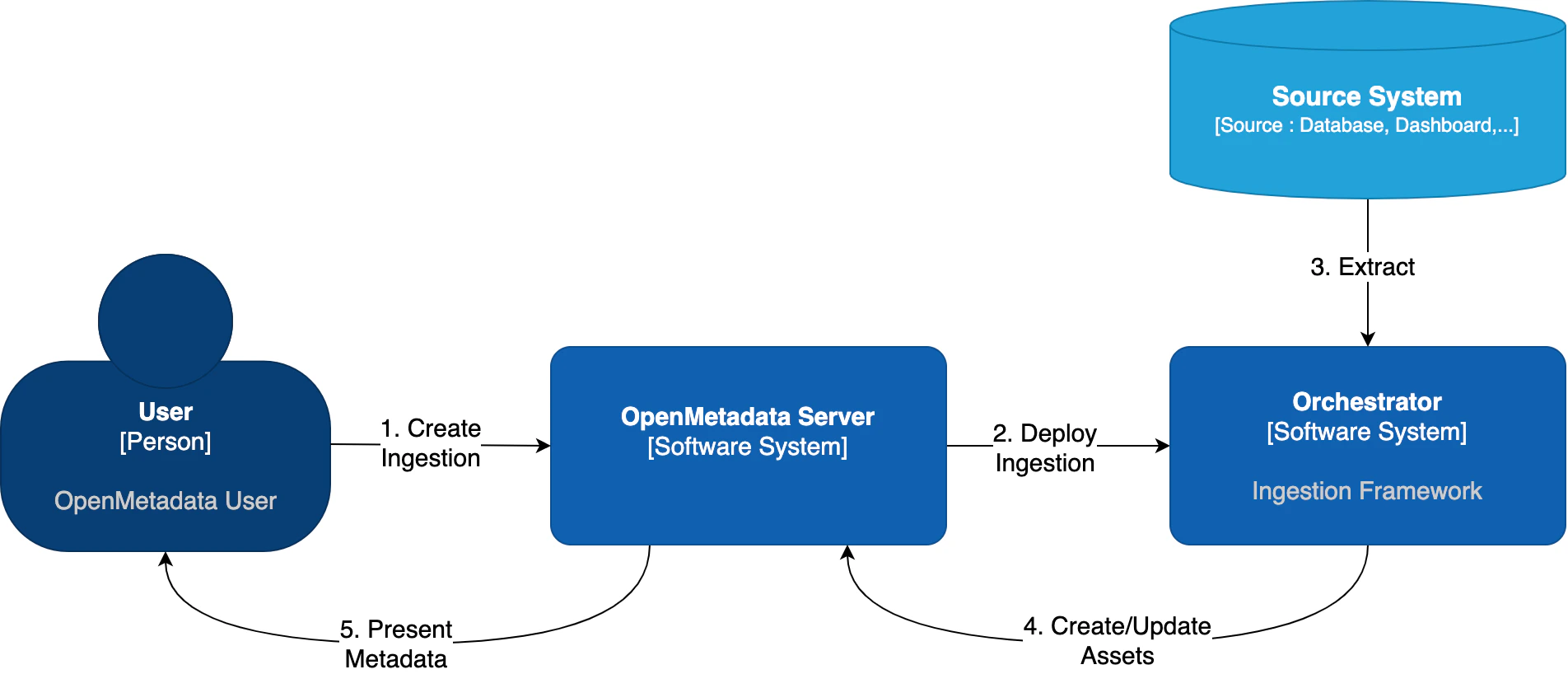
| Orchestrator | Description |
|---|---|
| Apache Airflow | The traditional approach - uses Airflow DAGs to manage pipelines |
| Kubernetes Native | New in 1.12 - Uses native K8s Jobs and CronJobs without requiring Airflow |
Airflow Setup
Continue below for Airflow configuration
Kubernetes Native
Use native K8s Jobs (no Airflow required)
Airflow as Orchestrator
Out of the box, OpenMetadata comes with integration for Airflow. In this guide, we will show you how to manage ingestions from OpenMetadata by linking it to an Airflow service.- If you do not have an Airflow service up and running on your platform, we provide a custom Docker image, which already contains the OpenMetadata ingestion packages and custom Airflow APIs to deploy Workflows from the UI as well. This is the simplest approach.
- If you already have Airflow up and running and want to use it for the metadata ingestion, you will need to install the ingestion modules to the host. You can find more information on how to do this in the Custom Airflow Installation section.
Airflow permissions
These are the permissions required by the user that will manage the communication between the OpenMetadata Server and Airflow’s Webserver:User permissions is enough for these requirements.
You can find more information on Airflow’s Access Control here.
Shared Volumes
We have specific instructions on how to set up the shared volumes in Kubernetes depending on your cloud deployment here.Using the OpenMetadata Ingestion Image
If you are using ouropenmetadata/ingestion Docker image, there is just one thing to do: Configure the OpenMetadata server.
The OpenMetadata server takes all its configurations from a YAML file. You can find them in our repo. In
openmetadata.yaml, update the pipelineServiceClientConfiguration section accordingly.
Custom Airflow Installation
You will need to follow three steps:- Install the
openmetadata-ingestionpackage with the connector plugins that you need. - Install the
openmetadata-managed-apisto deploy our custom APIs on top of Airflow. - Configure the Airflow environment.
- Configure the OpenMetadata server.
1. Install the Connector Modules
The current approach we are following here is preparing the metadata ingestion DAGs asPythonOperators. This means that
the packages need to be present in the Airflow instances.
You will need to install:
x.y.z is the same version of your
OpenMetadata server. For example, if you are on version 1.0.0, then you can install the openmetadata-ingestion
with versions 1.0.0.*, e.g., 1.0.0.0, 1.0.0.1, etc., but not 1.0.1.x.
You can check the Connector Modules guide above to learn how to install the openmetadata-ingestion package with the
necessary plugins. They are necessary because even if we install the APIs, the Airflow instance needs to have the
required libraries to connect to each source.
2. Install the Airflow APIs
The goal of this module is to add some HTTP endpoints that the UI calls for deploying the Airflow DAGs. The first step can be achieved by running:x.y.z is the same version of your
OpenMetadata server. For example, if you are on version 1.0.0, then you can install the openmetadata-managed-apis
with versions 1.0.0.*, e.g., 1.0.0.0, 1.0.0.1, etc., but not 1.0.1.x.
3. Configure the Airflow environment
We need a couple of settings:AIRFLOW_HOME
The APIs will look for theAIRFLOW_HOME environment variable to place the dynamically generated DAGs. Make
sure that the variable is set and reachable from Airflow.
Airflow APIs Basic Auth
Note that the integration of OpenMetadata with Airflow requires Basic Auth in the APIs. Make sure that your Airflow configuration supports that. You can read more about it here. A possible approach here is to update yourairflow.cfg entries for Airflow 3.x:
DAG Generated Configs
Every time a DAG is created from OpenMetadata, it will also create a JSON file with some information about the workflow that needs to be executed. By default, these files live under${AIRFLOW_HOME}/dag_generated_configs, which
in most environments translates to /opt/airflow/dag_generated_configs.
You can change this directory by specifying the environment variable AIRFLOW__OPENMETADATA_AIRFLOW_APIS__DAG_GENERATED_CONFIGS
or updating the airflow.cfg with:
4. Configure in the OpenMetadata Server
After installing the Airflow APIs, you will need to update your OpenMetadata Server. The OpenMetadata server takes all its configurations from a YAML file. You can find them in our repo. Inopenmetadata.yaml, update the pipelineServiceClientConfiguration section accordingly.
For installation validation, Git Sync guidance, SSL configuration, and troubleshooting Airflow pipeline issues, see the Airflow Troubleshooting & Advanced guide.