
Documentation Index
Fetch the complete documentation index at: https://openmetadata-feat-feat-2mbfixdeploy.mintlify.app/llms.txt
Use this file to discover all available pages before exploring further.
Docker Deployment
This guide will help you set up the OpenMetadata Application using Docker Deployment. Before starting with the deployment make sure you follow all the below Prerequisites.Docker Deployment Architecture
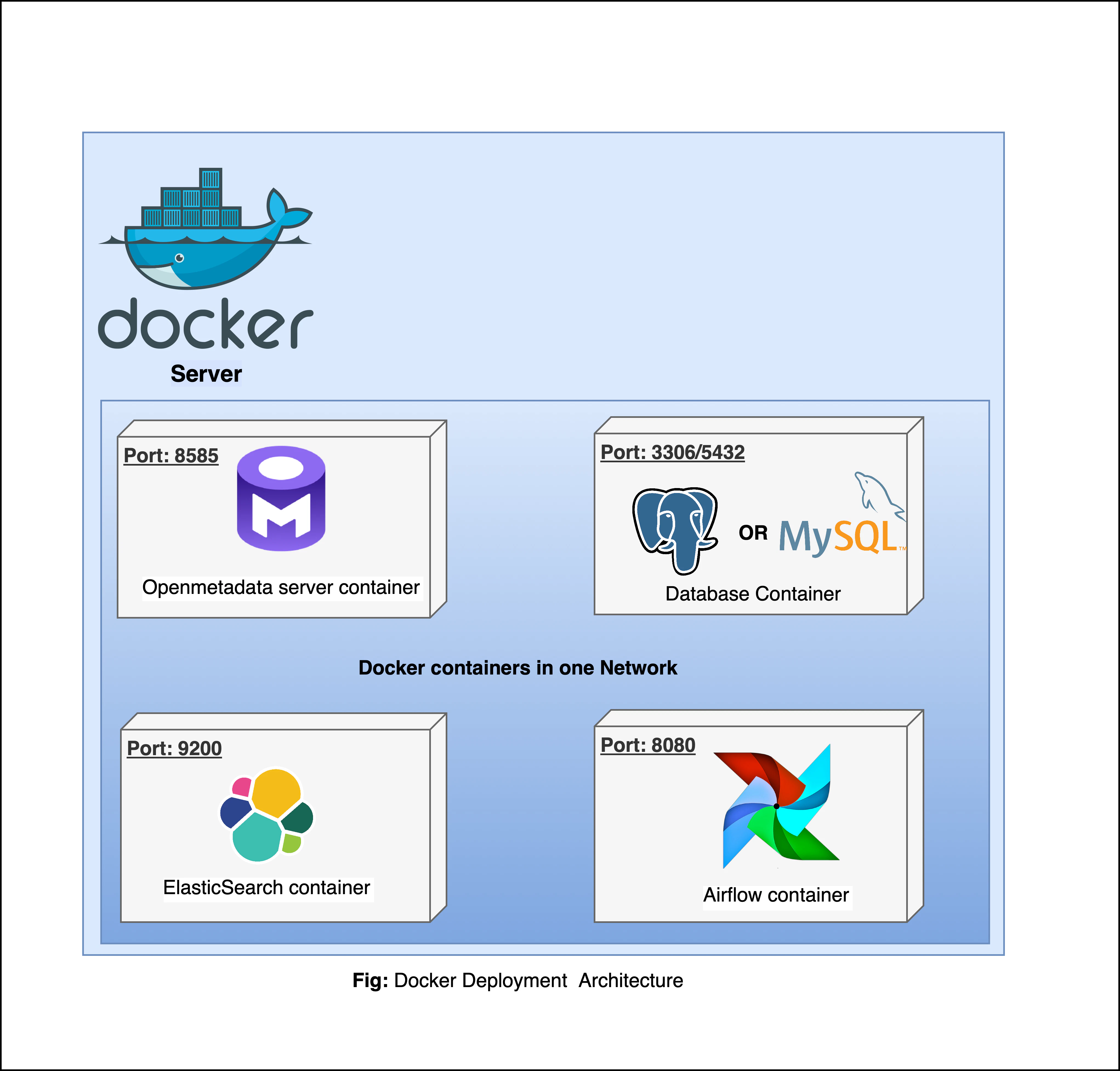
Prerequisites
Configure OpenMetadata to use External Database and Search Engine
For Production Deployment using Docker, we recommend bringing your own Databases and ElasticSearch Engine and not rely on quickstart packages.Configure External Orchestrator Service (Ingestion Service)
OpenMetadata requires connectors to be scheduled to periodically fetch the metadata, or you can use the OpenMetadata APIs to push the metadata as well- OpenMetadata Ingestion Framework is flexible to run on any orchestrator. However, we built an ability to deploy and manage connectors as pipelines from the UI. This requires the Airflow container we ship.
- If your team prefers to run on any other orchestrator such as prefect, dagster or even GitHub workflows. Please refer to our recent webinar on How Ingestion Framework works
Docker (version 20.10.0 or higher)
Docker is an open-source platform for developing, shipping, and running applications. It enables you to separate your applications from your infrastructure, so you can deliver software quickly using OS-level virtualization. It helps deliver software in packages called Containers. To check what version of Docker you have, please use the following command.Docker Compose (version v2.2.3 or greater)
The Docker compose package enables you to define and run multi-container Docker applications. The compose command integrates compose functions into the Docker platform, making them available from the Docker command-line interface ( CLI). The Python packages you will install in the procedure below use compose to deploy OpenMetadata.- MacOS X: Docker on MacOS X ships with compose already available in the Docker CLI.
- Linux: To install compose on Linux systems, please visit the Docker CLI command documentation and follow the instructions.
Install Docker Compose Version 2 on Linux
Follow the instructions here to install docker compose version 2-
Run the following command to download the current stable release of Docker Compose
This command installs Compose V2 for the active user under $HOME directory. To install Docker Compose for all users on your system, replace
~/.docker/cli-pluginswith/usr/local/lib/docker/cli-plugins. -
Apply executable permissions to the binary
-
Test your installation
Steps for Deploying OpenMetadata using Docker
1. Create a directory for OpenMetadata
Create a new directory for OpenMetadata and navigate into that directory.2. Download Docker Compose Files from GitHub Releases
Download the Docker Compose files from the Latest GitHub Releases. The Docker compose file name will bedocker-compose-openmetadata.yml.
This docker compose file contains only the docker compose services for OpenMetadata Server. Bring up the dependencies as mentioned in the prerequisites section.
You can also run the below command to fetch the docker compose file directly from the terminal -
3. Update Environment Variables required for OpenMetadata Dependencies
In the previous step, we download thedocker-compose file.
Identify and update the environment variables in the file to prepare openmetadata configurations.
For MySQL Configurations, update the below environment variables -
4. Start the Docker Compose Services
Run the below command to deploy the OpenMetadata -docker ps.