
Documentation Index
Fetch the complete documentation index at: https://openmetadata-feat-feat-2mbfixdeploy.mintlify.app/llms.txt
Use this file to discover all available pages before exploring further.
SSL Troubleshooting
In this section we comment common issues that the user can face when enabling SSL in OpenMetadata.Bot using JWT as authentication mechanism
After enabling SSL on the OM server, we have to update also the public keys URL for the validation of the JWT tokens by updating to the secured URL:https://{server_domain}:{port}/api/v1/system/config/jwks.
In case we are using a self-signed certificate, it will fail with the error below:
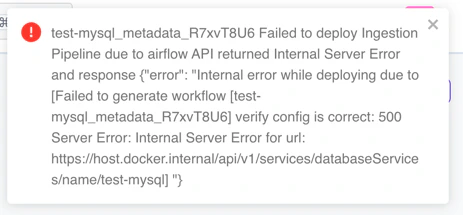
openmetadata_server container or pod.
After that, you can proceed with the following steps from your terminal:
- Go to your $JAVA_HOME/lib/security where the cacerts keystore is located.
- Run the following command once in the directory:
Deploying workflows in Airflow
One common issue after enabling SSL with a self-signed certificate is that our workflows in Airflow will fail or will not be deployed. We can notice it because the following error will be shown in the UI when deploying or re-deploying: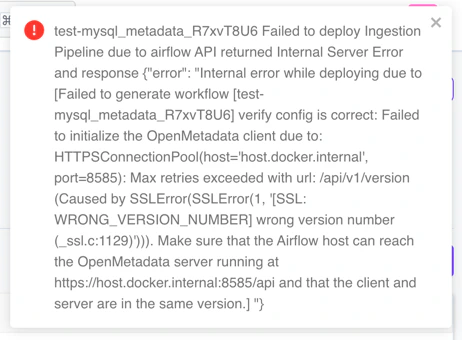
1. Validate the certificate using the public certificate (recommended):
We specify which public certificate must be used to validate the OM server connection.- Copy the public certificate into our Airflow instance.
- Update the configuration of our OM server so that each time a workflow is deployed, we send the new configuration.
- In docker:
- In bare metal:
conf/openmetadata.yaml file:
- In K8s:
values.yaml file with:
2. Ignore the certification validation (not recommended for production):
When doing any call to the secured OM server, the certificate validation will be ignored.- In docker:
- In bare metal:
conf/openmetadata.yaml file:
- In K8s:
values.yaml file with:
Ingesting from CLI
Similar to what happens when deploying workflows in Airflow, we have to update our workflow config file with one of these options:- To validate our certificate:
- To ignore certificate validation:
Demo of SSL enabled with an SSO and JWT token configured
In case you are looking for a full dockerized demo of how JWT tokens, SSO configuration, and SSL enabled work together, please visit our demo repository here.Providing a single keystore that has all the cacerts required
This can be achieved using theOPENMETADATA_OPTS environment variable configuration across all the deployments.
However, for Production, we recommend you to bundle your cacerts separately for each components (like ElasticSearch/Opensearch and Airflow) and provide that to each individual configs for openmetadata.yaml.
You can use this environment variable to also provide extra JVM parameters to tune the application as per your infrastructure needs.
Below is an example values to be set for the OPENMETADATA_OPTS environment variable to use cacerts truststore which is bundled for an organization issued certificates -